

Table of Contents
- What Are Historical 3D Outfits for DAZ Studio?
- Where to Source Historical 3D Outfits
- dForce Historical Clothing for DAZ: Realistic Fabric Simulation
- How to Fit Historical Clothes in DAZ Studio
- Popular Historical Periods and Outfit Styles
- Simplifying Your Historical Asset Workflow
- Conclusion
- Frequently Asked Questions
Last Updated: October 4, 2026
What Are Historical 3D Outfits for DAZ Studio?
Historical 3D outfits for DAZ Studio are digital clothing and costume assets designed to dress 3D characters in period-accurate garments spanning centuries of fashion history. These assets range from Victorian gowns and Medieval armour to Renaissance doublets and 18th-century coats, all built specifically for DAZ Studio’s character models. Finding authentic historical clothing assets that fit seamlessly into your workflow is essential for concept artists, animators, and digital creators building historical scenes or character designs.
Unlike generic clothing models, historical 3D outfits are engineered with proper topology, rigging, and material definition to work with DAZ Studio’s anatomy systems. They’re built to deform naturally when characters move, sit, or pose. The garments come with textures, materials, and often multiple variations, different fabric colours, worn states, or layering options, so you can create historically plausible costumes without spending weeks modelling from scratch.
These assets save significant production time. Rather than sculpting every fold and seam of a 16th-century chemise or Edwardian corset, you import the asset, apply it to your character, and focus on lighting, composition, and storytelling. For freelancers managing large asset libraries across multiple marketplaces, the installation and organisation of these files becomes its own challenge, which is where simplified workflows make the real difference.
Where to Source Historical 3D Outfits
Finding quality historical 3D outfits requires knowing where the DAZ Studio community publishes and sells assets. The primary marketplace is DAZ 3D’s official store, which hosts thousands of historical costume packs created by independent artists and studios. You’ll find dedicated collections for specific periods: Victorian era, Medieval, Ancient Egypt, Steampunk, and countless others. Many assets there include both male and female versions, child variants, and layered pieces you can mix and match.
Renderosity and other third-party DAZ asset retailers also stock historical clothing, often at competitive prices or with regular sales. The advantage of these platforms is variety, niche creators publish experimental or highly detailed pieces that may not appear on the main DAZ store. However, sourcing from multiple marketplaces creates a real problem: files scatter across different folders, version numbers conflict, and tracking which assets you own becomes tedious.
This is where a universal installer becomes invaluable. Rather than manually downloading, extracting, and sorting files from five different sources, you point your installer at your asset folders and let it handle the organisation. Matronius’s universal installer works with DAZ products from any marketplace, centralising your library so you can find and load historical outfits without hunting through nested directories.
When evaluating sources, check for:
- Asset resolution and polygon count (higher detail costs more memory)
- Compatibility with your DAZ Studio version
- Included textures and material options
- Creator support and update frequency
- Licensing terms (personal use vs. commercial)
dForce Historical Clothing for DAZ: Realistic Fabric Simulation
dForce is DAZ Studio‘s dynamic cloth simulation system, and it’s transformed how historical clothing behaves on screen. Rather than static geometry that clips through characters or looks rigid, dForce simulates fabric weight, gravity, and collision. A heavy velvet cloak moves differently than silk, and dForce captures that distinction.
Many modern historical 3D outfits use dForce technology. A Victorian gown with dForce will settle naturally when your character stands still, fold realistically when she sits, and swing believably when she walks. This realism is especially important in animation or high-resolution renders where viewers scrutinise every movement.
The trade-off is computational cost. dForce simulations demand more processing power and longer render times than static clothing. For still images or short clips, this is manageable. For full animations or real-time viewport preview, you may need to simplify the simulation or use lower-resolution proxy geometry during setup, then switch to high-detail for final renders.
When shopping for historical outfits, check whether they’re dForce-enabled. Some assets support it optionally, you can toggle it on or off depending on your needs. Others are static geometry only, which loads faster but looks less dynamic. Neither approach is inherently wrong; it depends on your project requirements.
For artists managing complex rigs and multiple assets, dForce simulations add another layer of technical management. Matronius’s specialised bridge for Blender to DAZ Studio helps simplify this by automating asset loading and rig compatibility checks, so you spend less time troubleshooting simulation errors and more time refining your characters.
How to Fit Historical Clothes in DAZ Studio
Fitting historical clothes in DAZ Studio involves several steps. Start by loading your character base, Genesis 3, Genesis 8, or whichever model your historical outfit is designed for. Then import the clothing asset and apply it to the character. In most cases, the asset auto-fits because it’s rigged to match that character’s proportions.
However, fit issues arise when your character deviates from the standard base. If you’ve scaled the character larger, modified body morphs, or used a third-party character model, the historical outfit may gap at seams, clip through the body, or hang incorrectly. Here’s where manual adjustment comes in.
Use DAZ Studio’s Fit Control tools to adjust the clothing to your character’s shape. Select the garment, then adjust scale parameters for different body zones, chest, waist, hips, arms. Small adjustments (5-10 per cent) usually solve gaps. For larger deviations, you may need to use the Inverse Kinematics or bone adjustment tools to reposition the garment’s rigging.
A practical workflow:
- Load character and historical outfit
- Pose the character in a neutral T-pose
- Check for clipping or gaps in the viewport
- Use Fit Control to scale garment zones as needed
- Test the fit with several poses (sitting, arm raised, bent forward)
- Save your fitted version as a preset so you don’t repeat the work
One common mistake is assuming historical outfits fit all character variants. A Victorian gown rigged for Genesis 8 Female won’t automatically fit Genesis 8 Male or a custom morphed character. Always verify compatibility before investing time in a project.
For artists juggling multiple character models and outfit variations, manual fitting becomes repetitive. Matronius’s one-click automation tools can automate aspects of this process, letting you batch-fit multiple outfits to the same character or apply saved fit presets across similar assets, significantly reducing setup time.
Popular Historical Periods and Outfit Styles
Historical 3D outfits span centuries, and each period has distinctive silhouettes, construction techniques, and aesthetic markers. Understanding these periods helps you choose assets that fit your project’s visual direction.
Medieval (5th-15th centuries): Simple tunic-and-hose combinations for commoners, elaborate surcoats and chainmail for nobility. Colours were often muted due to natural dyes. Medieval assets are popular for fantasy projects that borrow historical references without strict period accuracy.
Renaissance (14th-17th centuries): Fitted doublets, puffed sleeves, ornate brocades. This period saw dramatic silhouettes and rich fabrics. Renaissance outfits are among the most detailed historical assets because the period’s complexity rewards high polygon counts and intricate texturing.
Victorian (1837-1901): Corset-defined waists, full skirts supported by crinolines, elaborate trim and lace. Victorian assets dominate historical DAZ libraries because the silhouette is visually distinctive and the period remains culturally relevant.
Steampunk (19th-century inspired, alternate history): Leather, brass, goggles, aviator jackets. Not strictly historical, but heavily inspired by Victorian and Edwardian aesthetics mixed with industrial elements. Steampunk outfits are popular because they blend historical authenticity with creative freedom.
Ancient and Classical (Egypt, Greece, Rome): Draped linen, togas, simple construction. These assets often require less rigging complexity because the garments don’t have fitted seams, though getting the draping to look natural still demands careful simulation setup.
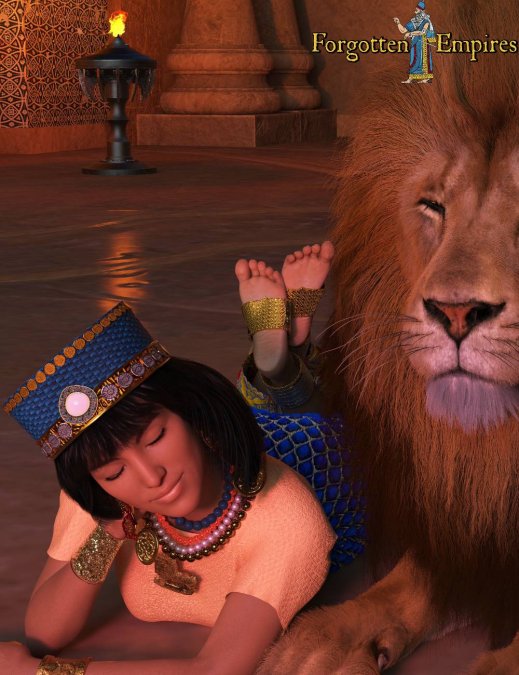
A 3D digital render showcasing the “Babylonian Priestess for Genesis 8 Female” outfit. A female character rests peacefully on her stomach on a stone floor beside a large male lion. She wears a blue cylindrical headdress with gold studs and gem details, layered beaded necklaces with gold medallions, a light peach short-sleeved top, a textured blue patterned skirt, gold arm cuffs, and gold anklets around her feet raised behind her. In the background, warm torchlight illuminates stone pillars and decorative wall tiles.
A 3D rendered female character wearing a detailed Victorian-era dress with intricate lace, layered skirts, and period-accurate accessories, displayed in neutral studio lighting against a soft grey background
When selecting a period for your project, consider:
- Visual distinctiveness (how recognisable is the period to your audience?)
- Asset availability (some periods have hundreds of options; others have fewer)
- Complexity tolerance (Medieval armour simulates differently than flowing Renaissance gowns)
- Narrative fit (does the costume support your story or concept?)
Simplifying Your Historical Asset Workflow
Managing historical 3D outfits efficiently requires a structured workflow. Without one, you’ll waste hours searching for files, re-fitting assets to characters, and troubleshooting compatibility issues across your library.
Start by organising your assets systematically. Create a folder structure by historical period, then by character type (male, female, child). Use consistent naming conventions, “Victorian_Gown_v2_Blue” is immediately recognisable; “Outfit_Final” is not. Tag your assets with metadata: period, character compatibility, dForce status, and whether the asset includes multiple colour variants.
Next, create character presets. Once you’ve fitted a historical outfit to a character, save that fit as a preset. The next time you use that character with that outfit, load the preset instead of refitting manually. Over time, you build a library of saved fits that dramatically accelerates project setup.
For artists managing thousands of assets across multiple marketplaces, a universal installer is essential. Rather than manually downloading and extracting files into the correct DAZ directories, an automated installer handles the organisation, reducing setup time from hours to minutes. Matronius’s universal installer works with historical assets from any marketplace, centralising your library and ensuring consistent folder structures across all your third-party content.
Additionally, maintain a version control system for your custom modifications. If you’ve edited a historical outfit’s textures or adjusted its rigging, save your modified version separately from the original. This prevents accidentally overwriting your work and lets you revert to the original if needed.
Batch processing is another efficiency gain. If you’re applying the same historical outfit to multiple character variations, use DAZ Studio’s batch fitting or scripting tools to apply the same adjustments across all instances, rather than fitting each character individually.
Conclusion
Historical 3D outfits for DAZ Studio unlock creative possibilities for concept artists, animators, and digital creators building period-accurate scenes or character designs. Whether you’re dressing a Victorian protagonist, outfitting a Medieval fantasy cast, or designing Steampunk characters, quality historical assets save weeks of modelling and texturing work.
The challenge isn’t finding these assets, it’s managing them efficiently once your library grows. Sourcing from multiple marketplaces, fitting garments to varied character models, and maintaining version control across hundreds of files becomes a bottleneck that slows your creative output.
Matronius simplifies this entire workflow. Our universal installer centralises your historical assets from any marketplace into a single, organised library. Our one-click automation tools reduce fitting time and ensure compatibility across your character variants and DAZ Studio versions. By removing the technical friction from asset management, you reclaim the time and focus needed for what matters: creating compelling visuals and telling your story.
Explore our products and join 500+ artists who’ve simplified their 3D workflows. Let Matronius handle the technical work so you can focus on the creative vision.
Frequently Asked Questions
Where can I find historically accurate clothing for DAZ Studio?
Historical 3D outfits for DAZ Studio are available through official DAZ marketplaces, specialist asset vendors, and third-party content creators. Many creators focus on period accuracy, offering everything from medieval to Victorian to contemporary historical pieces. Check compatibility with your DAZ Studio version and figure generation before purchasing. Matronius’s universal installer can help manage assets from multiple sources in one workflow.
How do I ensure historical outfits fit correctly in DAZ Studio?
Fitting historical clothes in DAZ Studio requires adjusting parameters like scale, position, and morphs to match your figure’s shape. Start by applying the outfit’s recommended figure base, then use the Fit to Figure tool. For dForce garments, enable cloth simulation to see realistic fabric drape. Test different poses to catch clipping issues. Many historical outfits include preset morphs for common figure types, saving time on manual adjustments.
What is dForce historical clothing and how does it differ from static outfits?
dForce historical clothing uses dynamic fabric simulation to create realistic cloth movement and drape, unlike static geometry outfits. When your figure moves or changes pose, dForce garments respond naturally to physics, making period costumes look authentic. This is especially valuable for animation work. However, dForce rendering takes longer than static clothing, so choose based on your project’s needs.
Can I use historical outfits from other platforms in DAZ Studio?
Some historical assets from other 3D platforms can be imported into DAZ Studio, but compatibility varies. Native DAZ assets work seamlessly with Genesis figures. Third-party content may require conversion or rigging adjustments. Matronius’s tools can help automate the installation and integration of multi-source assets, reducing manual sorting and compatibility issues across your library.