Last Updated: 4 November 2026
Quick Summary
The best plugins for 3D artist pipeline automation target the repetitive housekeeping around the creative work: installing third-party content, bridging rigs between applications and keeping folder structures tidy. Pick one tool per job, because add-ons that touch the same export settings will fight each other during a batch run.
- Blender add-ons are version-pinned, so check release notes before updating mid-project.
- Set one primary Content Directory and add secondary folders via Content Directory Manager.
- Save a Render Preset per lighting setup in Daz Studio rather than rebuilding settings by hand.
- Group Content Library Categories by project or figure generation instead of the vendor tree.
- Back up Content Library metadata before any bulk install or script-driven change.
Table of Contents
- Why 3D Artist Pipeline Automation Matters in 2026
- Blender Pipeline Management Tools That Cut Repetitive Work
- DAZ Studio Workflow Automation: From Install to Render
- 3D Asset Installation Automation for Scattered Libraries
- Free 3D Pipeline Automation Tools Worth Trying First
- How to Set Up a Small-Team Pipeline Without Breaking Files
- Choosing Your Automation Setup with Matronius
- Frequently Asked Questions
Why 3D Artist Pipeline Automation Matters in 2026
A 3D artist pipeline is the chain of steps between an idea and a finished asset: modelling, rigging, texturing, export, and render. Automation removes the manual hand-offs between those steps. For most artists, the biggest time sink is not the creative work. It is the repetitive housekeeping around it.
The best plugins for 3D artist pipeline automation target that housekeeping directly. They install assets, bridge files between applications, and keep folder structures tidy while you sculpt.
At Matronius, we build tools around exactly this problem. Our one-click automation handles third-party content installation and rig bridging, so the technical friction disappears.
Three tasks eat most of a freelancer’s week:
- Renaming and sorting downloaded asset packs
- Re-linking textures after a move between folders
- Rebuilding export settings for every new scene
Each one is small. Together they decide whether you ship a scene this week or next.
Blender Pipeline Management Tools That Cut Repetitive Work
Blender’s add-on system is the first place to look, but the useful tools are more specific than most round-ups admit.
| Bottleneck | Add-on or built-in tool | What it actually does | Watch for |
|---|---|---|---|
| Rigging a character from scratch | Rigify (bundled) | Generates a full deform rig from a metarig; supports custom metarigs saved as templates | Bone roll and axis orientation must match your export target or FBX re-import flips joints |
| Rebuilding a clean mesh from a sculpt | Quad Remesher (paid add-on) or the built-in Remesh modifier | Produces quad-dominant topology suitable for rigging and UV work | Remesh modifier is voxel-based and destroys UVs; plan a re-unwrap |
| Batch exporting many objects | Batch Export add-ons or a short Python script using bpy.ops.export_scene.fbx | Pushes selected collections to FBX/glTF in one pass with shared settings | Two batch exporters installed at once will fight over the same export operator |
| Snapshotting a .blend before risky edits | Blender’s own Save Versions preference plus a Git or SVN wrapper | Keeps numbered backups and lets you diff binary files via external tooling | Git does not merge .blend files; treat it as a snapshot store, not a collaboration layer |
| Enforcing naming and collection rules | Batch Rename (built-in, Ctrl+F2) | Regex rename across objects, meshes, materials and bones | Renaming a mesh datablock does not rename the object, and vice versa |
A few practical notes that the generic round-ups skip:
- Auto Run Python Scripts is a security setting, not an automation feature. Enabling it globally means any .blend you open can execute code (Scripting & Security). Enable it per-session from Preferences > Save & Load only when you trust the file.
- The Asset Browser is useful for marking reusable assets, but it stores absolute paths by default. If you move a library folder, marked assets break. Set a library root and keep it stable.
- Rigify and third-party auto-riggers do not produce identical bone hierarchies. If your downstream target is Daz Studio, Unreal or Unity, pick the rig tool that matches the skeleton your bridge expects, not the one with the prettiest viewport result.
For artists moving content into Daz Studio, our Blender to Daz Studio plugin handles the bridge in one step. A common mistake is installing five add-ons that each touch the same export settings. They fight each other. Pick one tool per job and disable the rest before a batch run.
Watch out: Blender add-ons are version-pinned. Before updating Blender mid-project, check each add-on’s release notes for the target version, a broken exporter halfway through a delivery is far more expensive than delaying the update.
DAZ Studio Workflow Automation: From Install to Render
Daz Studio rewards a tidy setup more than most applications, and the automation surface is wider than the Content Library alone. The three areas worth automating first are installation, library organisation and render setup, in that order, because each depends on the one before it. Once installation, library organisation and render setup are dependable, AI automation tools can help freelance artists connect these repeatable tasks to the wider flow of client work.
1. Lock down the Content Directory before anything else
Daz Studio resolves assets by a path stored in its database. If the Content Directory does not match where the files actually live, assets may fail to load correctly (Getting error when loading content from other folders).
A workable pattern for artists with assets in several places:
- Choose one primary Content Directory and make it the default for new installs.
- Add secondary directories as Content Directory Manager entries rather than moving files between them.
- Run Content DB Maintenance > Re-Import Metadata after any bulk move, so the database matches the disk.
2. Organise by project, not by vendor
The Content Library’s Categories are user-defined and independent of the vendor folder structure on disk. Most practitioners find that grouping by project or by figure generation (Genesis 8, Genesis 8.1, Genesis 9) is faster to navigate than the default vendor tree, because it matches how you actually search during a scene build.
A useful habit is to keep a Products view for installation checks and a Categories view for working. The two answer different questions: “is this installed?” versus “where is the asset I need right now?”.
3. Automate the render side with presets and scripts
Iray render settings, environment maps, tone mapping and render quality all live in presets. Save one Render Preset per lighting setup you reuse, and load it rather than rebuilding by hand.
For repetitive tasks that presets cannot cover, bulk-renaming morph dials, fixing category assignments across dozens of products, or normalising figure scale, Daz Studio’s built-in Script IDE runs DzScript and Python.
A few mechanisms worth knowing before you script against them:
- Auto Follow Transforms versus Redirect Transform changes how a node inherits its parent’s motion. Scripts that assume one behaviour will produce wrong results under the other.
- ERC (Enhanced Remote Control) links a property dial to another property, typically a joint rotation driving a corrective morph (What is Joint Coreectives?). Bulk-editing ERC links by script is possible but fragile; test on a duplicate figure first.
- Morph Loader Pro is the correct entry point for importing deltas from ZBrush or another DCC. Importing via the wrong loader silently drops scale deltas.
If your bottleneck is installation rather than rendering, our Universal Product Installer helps install third-party content.
Watch out: back up the Content Library metadata before any bulk install or script-driven change. A corrupted database is recoverable, but only if you have a recent copy, and the recovery is slower than the backup.
3D Asset Installation Automation for Scattered Libraries
Most artists end up with assets in several places. One folder from an old marketplace, another from a bundle, a third on an external drive. Finding anything becomes a search job.
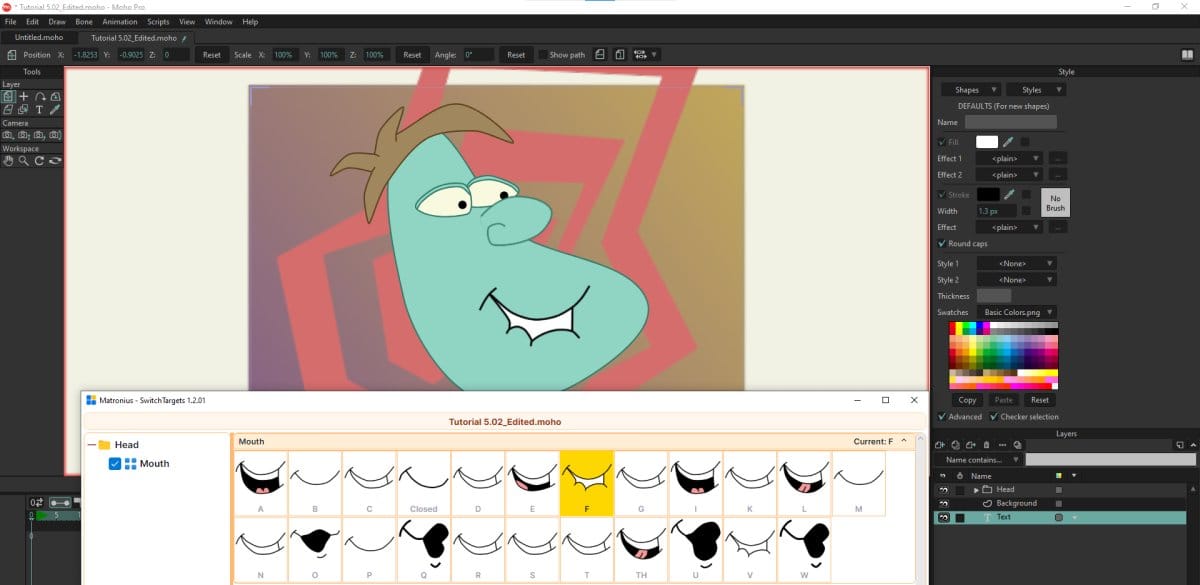
A universal installer is built to handle third-party DAZ content from multiple sources. Our Universal Product Installer is designed for exactly that.
The practical checklist before you install anything new:
- Confirm the target Content Directory is set correctly
- Check the product supports your Genesis generation
- Back up your library metadata before a bulk install
- Run a test load on one figure after installing
Free 3D Pipeline Automation Tools Worth Trying First
Free tools deserve a fair hearing before you spend anything. Blender’s add-on ecosystem is the obvious starting point, and many of its best automation scripts cost nothing.
Worth trying:
- Rigify for automatic character rigs
- Batch rename utilities built into your operating system
- Daz Studio’s own Script IDE for simple repetitive tasks
- Community Python scripts for bulk content library fixes
The limitation is support. Free scripts break when an application updates, and nobody is obligated to fix them. For a solo artist on a tight budget, that trade-off is often fine. For anyone running client work with deadlines, it is a risk.
If budget is the deciding factor, our article on affordable automation tools for freelance artists goes deeper into the free-to-paid path.
How to Set Up a Small-Team Pipeline Without Breaking Files
File breakage in a small team almost always comes from two people editing the same asset. The fix is process, not software.
Set these rules on day one:
- One master file per asset. Everything else is a copy.
- A shared folder structure that every artist follows exactly.
- A naming convention with the date and artist initials in the filename.
- A weekly archive of the whole project folder.
Version control helps, but for small teams a disciplined folder structure plus dated filenames covers most of the risk. If you are building this out properly, our 3D pipeline tool category page covers the software side.
A common mistake is letting each artist keep a personal copy of the “real” file. Within a month, nobody knows which one is current.
Choosing Your Automation Setup with Matronius
The right setup depends on where your time actually goes. If installation and library sorting dominate, start there. If rig transfers between applications are the bottleneck, fix the bridge first.
Here is how we would choose:
| Your bottleneck | First tool to add | Why |
|---|---|---|
| Scattered asset libraries | Universal installer | Places files correctly in one pass |
| Rig transfers between Blender and Daz | Blender to Daz Studio bridge | Removes manual re-import steps |
| Photoshop layer loss on import | Layer-fidelity import tool | Keeps Z-order intact |
| Repeat export settings | Saved presets | One click per scene |
Matronius builds one-click tools for each of these jobs. Join artists already using these workflows.
Frequently Asked Questions
Which plugins can automate a 3D artist’s workflow?
The most useful plugins target the tasks you repeat every session: asset installation, rig transfer, shader conversion and file versioning. For DAZ Studio users, a universal installer handles third-party content from multiple marketplaces in one pass. For Blender, add-ons that manage collections, batch-rename objects and automate export settings remove hours of manual clicking. Matronius builds one-click tools that bridge Blender to DAZ Studio and import Photoshop layers with Z-order intact, so the repetitive parts of a 3D artist pipeline run without supervision.
How can I automate asset installation in a 3D workflow?
Start by auditing where your assets actually live. If products are spread across several marketplace folders, a universal installer that reads the standard DAZ Studio content structure can place runtime files, textures and metadata in the correct directories automatically. Check that the tool preserves your existing folder hierarchy and does not overwrite custom categories. Matronius’s installer is built for exactly this: it handles third-party DAZ products from multiple sources so you spend time creating rather than sorting folders.
Are there free 3D pipeline automation tools?
Yes, and they are worth testing before you buy anything. Blender ships with Python scripting and the Rigify add-on for metarig-based rigging, both free. DAZ Studio includes batch rendering and scripted installers via its scripting interface. Free tools cover the basics well, but they usually stop short on cross-application work such as rig transfer between Blender and DAZ Studio or Photoshop layer fidelity. Use free options to learn what your pipeline needs, then move to a dedicated plugin for the gaps.
Which pipeline tools work with both Blender and DAZ Studio?
Cross-application tools are the hardest to find, because most plugins target one DCC application. A working Blender-to-DAZ Studio bridge needs to carry rig hierarchies, weight maps and material assignments without corrupting the figure. Matronius develops a specialised bridge for this direction, alongside tools that keep Photoshop layer order intact on import. Always test a bridge on a copy of a complex rig before committing a live project, and confirm the plugin is maintained for your DAZ Studio and Blender versions.
Your pipeline will not fix itself, and every week spent sorting folders is a week not spent creating. Matronius gives you one-click installation, a working Blender to Daz Studio bridge, and Photoshop import that keeps your layer fidelity and Z-order intact. Get started with Matronius and spend your time on the work that actually ships.
