
Quick Summary
You can buy historical 3D character outfits from asset creators’ own stores, general marketplaces, community galleries and free model libraries. Before paying, check the figure generation, fitting support and the licence terms, since fitting problems and restrictive licences are the most common reasons purchases go wrong.
- Check which figure generation the listing names, such as Genesis 8, 8.1 or Genesis 9, before buying.
- Prefer outfits with native fit-to versions for each generation you use.
- Test the outfit on its native figure in a deep knee bend and a raised-arm pose.
- Read the licence to confirm commercial use and whether resale or redistribution is allowed.
- Assess historical accuracy, topology and rigging readiness separately, not just the ‘medieval’ or ‘Roman’ label.
Table of Contents
- Where to Buy Historical 3D Character Outfits
- Checking DAZ Studio Clothing Compatibility Before You Buy
- Genesis 8, 8.1 and Genesis 9 Fitting Differences
- Reading a 3D Clothing Asset Licence
- Free Historical Clothing 3D Models: What to Expect
- Historical Clothing 3D Models: Accuracy, Topology and Rigging
- File Formats and Import Checks Before Purchase
- Choosing Your Next Historical Outfit Purchase
- Frequently Asked Questions
9 Places to Buy Historical 3D Character Outfits
Last Updated: November 5, 2026
Where to Buy Historical 3D Character Outfits
Buying historical 3D character outfits is easier when you know where to look and what to check before you pay. This guide is designed to help you compare your options.
A 3D artist working on a fantasy scene often wants a medieval tunic, a Roman soldier’s armour or a period dress that fits a specific character. The right source saves hours of rework, so start by deciding which era, figure base and licence terms you need.
Most artists buy from a handful of channels: the official stores of asset creators, general marketplaces, community galleries and free model libraries. DAZ 3D Store product catalogue is one example, but we do not recommend it over our own collection on this page.
Matronius sells its own historical outfits directly. Browse the historical outfit collection to see the current range before comparing other sources.
Checking DAZ Studio Clothing Compatibility Before You Buy
Compatibility is the first thing to check. A historical outfit built for one figure base will not always fit another without adjustment.
Look for the figure generation named in the product listing, such as Genesis 8, Genesis 8.1 or Genesis 9. Check whether the outfit includes morphs for the figures you use most, and whether the listing states which DAZ Studio version it needs.
If you are unsure, browse Genesis 8 outfits to see how fitting is handled for that base, then compare with the newer figure you plan to use.
Genesis 8, 8.1 and Genesis 9 Fitting Differences
Fitting is where most historical outfit purchases go wrong, because the figure generations do not share a skeleton.
Before you buy, read the listing for one of three signals:
- Native fit-to versions for each generation you use. This is the cleanest option and the one to prioritise for layered historical garments such as doublets, gowns and cloaks.
- A single fitted version plus morphs for the other bases. Workable, but you inherit the seller’s morph coverage and cannot easily extend it.
- No stated fitting support. Treat this as a project, not a purchase, unless you are comfortable re-fitting.
A practical check before you commit to a purchase:
- Load the outfit on its native figure and pose the character into a deep knee bend and a raised-arm pose.
- Note where the mesh clips or stretches, shoulders, hips and elbows are the usual failure points.
- If you intend to use a different generation, run Transfer Utility and repeat the pose test.
- Inspect the result in the Node Weight Map Brush to confirm the weights follow the garment’s seams rather than bleeding across them.
Watch out: a garment that fits cleanly in the default pose can still fail once dForce is enabled, because simulation redistributes the mesh according to surface properties rather than the original weight map. Test with simulation on before you rely on the fit.
If you are comparing bases, browse Genesis 8 outfits to see how fitting is handled for that generation, then repeat the same pose test against the newer figure you plan to use. Outfits that ship with fit-to options for several generations save the most time on layered historical pieces, where re-fitting by hand is slow and error-prone.
Reading a 3D Clothing Asset Licence
Licence terms decide how you can use an outfit. Read them before you add anything to your cart.
Check whether the licence allows commercial use, such as selling renders or using the model in a game, and whether redistribution or resale of the model file is permitted. Some licences cover personal renders only.
For regional pricing and licence considerations, see our guide on purchasing 3D assets with regional pricing, which explains how terms can differ by market.
Free Historical Clothing 3D Models: What to Expect
Expect variation in topology, UV layout and texture quality. Free models may lack morphs for different figure bases, so you may need to spend time on fitting. Check the licence before using a free model in a commercial project.
Historical Clothing 3D Models: Accuracy, Topology and Rigging
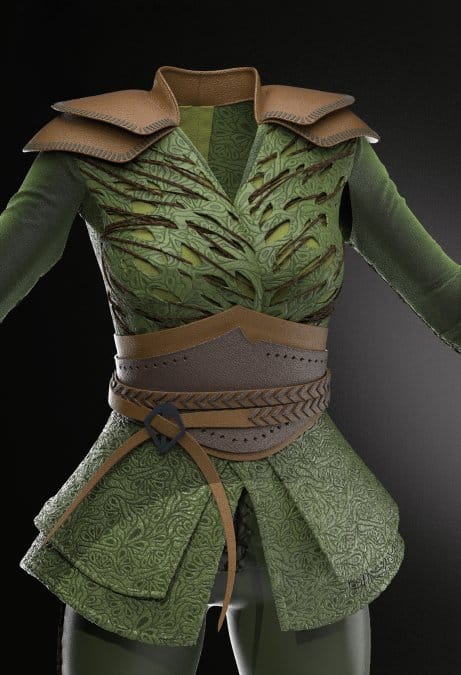
Most catalogues label an outfit ‘medieval’ or ‘Roman’ and stop there. That label tells you almost nothing about whether the garment suits your scene, so assess three things independently: historical accuracy, topology, and rigging readiness.
Assessing historical accuracy
Break the label down into period, region, class and use. A ‘medieval’ gown could be anything from a twelfth-century bliaut to a fifteenth-century houppelande, and the cut, closures and layering differ enormously. Check the listing and preview images for:
- Silhouette and cut, does the waistline, sleeve shape and hem length match your reference period?
- Closures and fastenings, lacing, buttons, pins and buckles are strong period indicators and are often the first thing a low-effort asset gets wrong.
- Layering, historical dress is usually layered (chemise, kirtle, gown, cloak). A single-piece ‘outfit’ may not support the layering your scene needs.
- Materials, linen, wool, silk and leather behave and drape differently; check whether the shaders suggest the right weight of cloth.
Reading topology for animation
Topology determines how the garment deforms. Clean edge flow around the shoulders, hips and knees produces better bends than a dense but irregular mesh, and quad-dominant meshes are easier to sculpt and re-weight than triangulated ones. For historical garments with loose fabric, look for enough edge loops through the skirt and sleeves to support simulation and posing without collapsing.
Rigging and simulation readiness
This is the detail catalogues rarely state, and it is the one that decides whether an outfit is usable in a game or animation pipeline. Confirm:
- Rigging method, does the outfit use the figure’s standard bones, or does it rely on dForce simulation? Rigged garments are predictable and game-friendly; dForce garments look better in stills but need simulation baked before export.
- dForce setup, if the outfit is dynamic, check that it ships with dForce modifier weight nodes and sensible surface properties (friction, density, stretch and bend resistance). A garment without these will explode or clip on the first simulation.
- Morph coverage, check which figure morphs the outfit supports, since historical silhouettes often depend on a specific body shape.
- Game readiness, for real-time engines, ask whether the mesh is optimised, whether LODs exist, and whether the textures are PBR-ready.
Watch out: a dForce garment that renders beautifully in a still can be unusable in a game without baking the simulation to a rigged mesh first, so decide your target pipeline before you buy.
For a deeper walkthrough of fitting and simulation mechanics, see our guide on purchasing 3D assets with regional pricing, and compare the historical outfit collection against the checklist above before committing.
File Formats and Import Checks Before Purchase
Before you commit, check that the product lists the formats you need, that it states the unit scale, and that the textures are included rather than linked to external sites. A quick test import into a blank scene will show whether the outfit loads cleanly and fits your figure.
Choosing Your Next Historical Outfit Purchase
Start with the figure you use most, then choose the era, check the licence and test the file format. An outfit that matches all four saves the most time.
Matronius has built its historical outfits to fit the DAZ Studio figures most artists use, and you can browse the full 3D outfit range to compare styles. For the wider historical selection, see Matronius historical clothing, which groups garments by period and use.
Frequently Asked Questions
Where can I buy historical 3D clothing for DAZ Studio?
Historical 3D clothing for DAZ Studio is sold through the official DAZ 3D store, third-party marketplaces and independent vendor shops. Check each listing for the figure generation it supports, such as Genesis 8, 8.1 or Genesis 9, before buying. Current prices vary with the item and bundle, so check the vendor’s website for the latest pricing.
How can I check whether a historical 3D outfit works with my DAZ Studio figure?
Read the product description and compatibility notes carefully, paying attention to the base figure named, such as Genesis 9 or Genesis 8.1. Look at the preview renders and any listed morphs or fitting notes. Where possible, download the free preview or read reviews from other buyers who used the same figure. Mixing generations often causes poor fitting, so confirm the match before you purchase.
What should I check in a licence before using a 3D clothing asset?
Confirm whether the licence allows commercial use, redistribution, and use in renders you sell or publish. Check whether the asset may be modified and whether credit to the creator is required. Licence terms differ between vendors and marketplaces, so read the full agreement rather than a summary. If the terms are unclear, contact the vendor before you use the asset in a paid project.
Are free historical clothing 3D models suitable for character renders?
Free historical clothing 3D models can suit personal renders and learning projects, but check the licence before using them commercially. Inspect the topology and fitting on your chosen figure, as free assets are not always rigged or tested thoroughly. Compare the file formats offered and confirm the asset loads cleanly in DAZ Studio before building a scene around it.
